BLeadX Team Management

Built for Teams, Not Just Individuals

Add your team, control exactly what each person can see, and let BLeadX automatically balance new leads across everyone based on who's actually free to take them -- while managers keep full visibility over the whole team, not just their own leads.

Automatic, balanced lead assignment Unlimited team members on Business Free forever to start
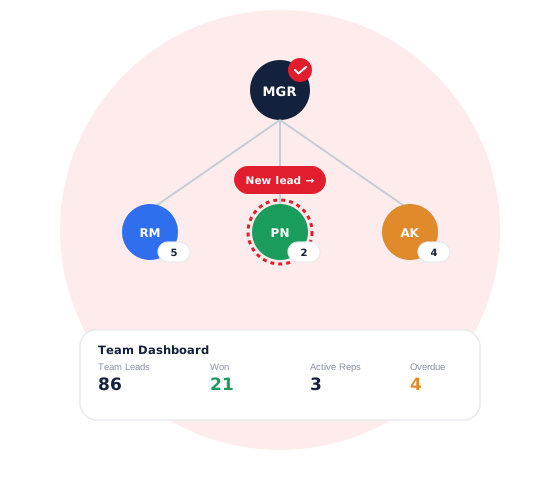
A manager overseeing a sales team, with a new lead automatically routed to the team member with the fewest open leads, and a team dashboard summary below
Why Team Structure Matters

A Team Without a System Is Just People Sharing an Inbox

Hiring more salespeople doesn't automatically mean more deals closed -- not if leads keep piling up on whoever happens to check first, and managers have no way to see what's actually happening.

01

Unbalanced Work Burns Out Your Best Rep

Without a system, new leads tend to land on whoever's fastest to notice -- not whoever has room for them.

02

Access Control Isn't Optional

Not everyone on the team should see every deal -- structure protects both your data and your reps' focus.

03

Visibility Is What Makes Coaching Possible

A manager can't help a struggling rep improve without being able to see what they're actually doing.

What Running a Sales Team Usually Looks Like

New Leads Pile Up on One Person

No system to spread them out, so one rep ends up overloaded while another sits idle.

No Control Over Who Sees What

Every rep can see every deal, whether they should or not.

Reassigning Means Chasing Someone on Chat

"Can you take this one?" gets typed into a group chat and hoped for the best.

Managers Have No Real Picture

No way to see how the team's actually performing without asking each rep individually.

How BLeadX Solves It

Everything a Growing Sales Team Needs

Role-Based Access

Staff see only the leads assigned to them; managers see the whole team's pipeline. No extra setup required.

Automatic, Balanced Lead Assignment

Every new lead goes to whoever on the team currently has the fewest open leads -- no manual routing needed.

Reassign in a Couple of Clicks

Move a lead to someone else on the team whenever you need to, without leaving BLeadX.

A Team-Wide Dashboard

Managers get one view of the entire team's leads, performance and pipeline -- not just their own.

Every Change Logged Automatically

Reassignments and updates are recorded right on each lead's own history, with who did it and when.

Unlimited Team Members on Business

Starter and Professional are single-user by design -- Business supports as many team members as you need, with no per-seat cap.

From Solo to Team, Without Starting Over

1

Add a Team Member

They get their own login and an email to set up their password.

2

Set Their Role

Staff see only their own leads; managers see everything.

3

New Leads Balance Automatically

Each one routes to whoever currently has the lightest load.

4

Manage From the Team Dashboard

See the whole team's pipeline and performance in one place.

Team Management Questions, Answered

No -- a staff member only sees the leads assigned to them. Only admins and managers see every lead across the whole team.

BLeadX automatically routes each new lead to whichever team member currently has the fewest open leads, so work stays balanced without anyone having to assign it by hand.

Yes -- admins can reassign any lead to any team member in a couple of clicks, and the change is recorded on that lead's own history automatically.

Yes -- every reassignment, status change and update is logged on the lead's own timeline with who made it and when, so a manager can always see exactly what happened.

Starter and Professional are single-user plans. BLeadX's Business plan supports unlimited team members.

Team management, role-based access and the team dashboard are part of BLeadX's Business plan. See the pricing page for full plan details.

Ready to Bring Your Team Into BLeadX?

Start free today, and upgrade to Business whenever you're ready to add your team -- no credit card required to begin.